Recently I've been experimenting with Steam's In Home Streaming and Big Picture mode.
I have a spare Mac Book Pro and Steam is available for Mac OSx now, so I thought I'd try it out. (Truth be told, it's been available for some time but this story will go beyond that.)
Valve recently released a new technology, In Home Streaming designed to allow gamers to play games even on platforms where their game of choice ianr supported. For example playing on the couch using a small laptop which might be more comfortable. In Home Streaming is a client-server technology tgat works wothin your local network to capture the video and audio from your desktop computer and sending it to your laptop pc, and and the same time, sending to the inputs back to the host pc. Of course, it doesnt have to be a desktop to a laptop .Could be cross platform as well so you can play Windows games on a Linux or Mac pc.
In Home Streaming works surprisingly well, passing the game's output to the client and passing back the control to the server.
What I wanted to do was to be able to play PC games on the TV and use Logitech's F310 Xbox 360 compatible controllers. I'm going for the whole "lean back experience".
After much experimentation, i finally got all the pieces in place for playing games on the TV.
I tried to use the Mac natively but the game controllers weren't supported on Mac so I switched to using Windows under Boot Camp.
I'm not very good at playing games on a controller but racing games or simple games are ok. Music games like Audio Surf aee very fun on the TV with nice sound.
This post was actually created as part of a speed blogging session for BarCamp so it's a bit unplanned.
Saturday, March 21, 2015

Sunday, October 12, 2014
The Witcher 2. Finished.
So, I've finished The Witcher 2 - Assassins of Kings, in only about 3 months instead of the 2 to 3 years that the first game took (of course, there were large breaks during that time where I was not gaming or playing other games). The Witcher 2 took about 40 - 43 hours of play time which puts it quite close to the developers' estimate of 40 hours. In those 3 months of Witcher 2 I probably only took 1 or 2 week breaks as the game had a much faster pace


What's Changed
It wouldn't be a sequel without a comparison to the earlier game, and CD Projekt RED has given us much to compare! New story, new gameplay, totally new engine.
New Story
I'll be brief here so as not to give anything away, this story takes place over 4 main distinct areas - 2 battle fields and two towns. The game sticks quite closely to the story this time, with only a few side quests per chapter. As much as the side quests in RPGs are fun - optional quests that you can choose to veer off and take a break from the main story, I think it worked quite well here to limit them. The game seemed flow a bit better and didn't get as tiresome.
New Gameplay
A modern game deserves modern gameplay and CD Projekt RED have succeeded in this regard. The combat is a lot faster paced with full support for game controllers since it is also released for consoles. After the first few fights I got used to the new combat system, but I'll always think fondly of The Witcher's system of combat. There was something epic feeling about pressing X for Group attack style or C for Fast and having to decide which combat style to use depending on which enemy you're fighting. In the The Witcher 2 you left-click for Fast attack or right-click for Strong (or is it the other way?). I was never able experience proper combat with this new system, I ended up just everything enough times it died. Though according to the GoG.com forums, this new system would give increased control. In first game, you really only had to click when the cursor changed to a flaming sword icon, then you'd get the combos and attack bonuses. Hopefully I'll get a better feel for the combat system in the third installment. This video by "WrathzRevenge" on YouTube gives a good indication. There is some swearing though, please supervise your kids!
In the Witcher 2 you now have the ability to use the Witcher Sign Axii during conversation to influence the conversation a certain direction or gain knowledge that the character wouldn't otherwise have told you (previously you could only use Axii during combat, and it didn't seem very useful there anyway). As well, you can Intimidate (threaten) the character into cooperating with you, again for an increased chance of them giving you something or doing something for you. Another new addition to conversation is time based dialogue. To encourage the player to make a particular choice and simulate a sense of urgency, some dialogue lines have have a time attached.
These additions worked well I think - using Axii during a conversation gives the player as Witcher a powerful feeling, while giving the player some chance to use the ability even if they mightn't bother during combat. I never used it during combat, primarily because it seemed to use precious seconds during a battle and well, I wasn't that coordinated to try it, even in the first game. (Actually, I never used Yrden the trap sign in Witcher 1 either, I think it seemed useless the one time I tried it.) Intimidation is an expected ability for a (in-)famous Witcher to have, and these days it's a common ability in modern RPGs.
Minigames
The Witcher gave us fist fighting and dice poker minigames for player enjoy if they didn't feel like hunting monsters. The Witcher 2 adds arm wrestling and updates the mechanics of the dice poker and fist fighting games. Notice I said "updates", not "improves". The fist fighting matches are now a WASD based quick-time event (but fortunately, they are actually achievable), and with the new engine now look quite nice and fluid. Video by Keenage
The dice poker games have unfortunately gone backwards, with the printed numbers on the die in a such an exotic font that it's quite difficult to read and the player's mouse influencing the roll of the dice to such an extent that you could roll them outside of the game board.


Fortunately, due to the faster pace of the second game, there wasn't as much time to sit around playing dice games.
New Game Engine!
In the first game, CD Projekt licensed the Aurora Engine (and heavily modified it to add more 3D and special effects) from Bioware, known for the Neverwinter Nights games. As I discussed previously, this did have some limitations, the most noticeable one for me was only being able to walk around on pre-defined ramps to areas that were raised compared to other areas.
For The Witcher 2, CD Projekt was able to use the funds they raised from the first game and expertise they learned to build their own game engine which you've seen above. This new engine is much more capable and now provides for multiple levels within an area such that you can climb up or down to get to, such as ledges via ladders or valleys via rock faces. When click on the ladder or rock face to climb it, Geralt automatically does that action and animates for the player. You don't have to keep holding the key to climb.
In the Aurora Engine, every area was a separate rendering scene so the game needed to load and unload maps even when you entered a simple area like a house or a whole new area like a cave. In RED Engine the transition between outside areas is seamless and fluid - you can enter a cave from the forest as you would in real life - by waking down it! One curious thing though, While there wasn't any loading time so speak of between an outdoor area and an indoor area you had to click the door to open it. This was fine and makes perfect sense... Until you have to follow an NPC and they open the door for them self, but then promptly slam it in your face, rudely interrupting your following of them on your mission!
For The Witcher 2, CD Projekt was able to use the funds they raised from the first game and expertise they learned to build their own game engine which you've seen above. This new engine is much more capable and now provides for multiple levels within an area such that you can climb up or down to get to, such as ledges via ladders or valleys via rock faces. When click on the ladder or rock face to climb it, Geralt automatically does that action and animates for the player. You don't have to keep holding the key to climb.
In the Aurora Engine, every area was a separate rendering scene so the game needed to load and unload maps even when you entered a simple area like a house or a whole new area like a cave. In RED Engine the transition between outside areas is seamless and fluid - you can enter a cave from the forest as you would in real life - by waking down it! One curious thing though, While there wasn't any loading time so speak of between an outdoor area and an indoor area you had to click the door to open it. This was fine and makes perfect sense... Until you have to follow an NPC and they open the door for them self, but then promptly slam it in your face, rudely interrupting your following of them on your mission!
Things I Miss From The First Game.
Actually, I miss most of my favourite game play elements! But some are more important than others...
Adding custom waypoint markers - This was quite handy in W1 to help prevent the player getting lost, particularly in the swamps where it's important to follow a particular route through the swamp. This would have been very useful in some parts of W2 in the forests since the trails weren't marked very well and again, if you didn't take the right path, you'd end up some where else in the forest.
Click to move if you're lazy and pausing the game even in mid battle - Clicking to move didn't really make sense in this new game anyway, it's a product of older RPGs and this game only had one camera view, Over The Shoulder. The only real problem is you can't play the game while eating because you need to actually control Geralt now. (Before, I could take a spoonful of food and click to move around and he'd automatically walk there.) Pausing the game in the middle would have been cool to look at the effects, but I think they were deliberately going for a faster paced game this time.
Alcohol and potions. In The Witcher, you could collect alcohol that you found or bought, and you actually need it as an alchemical base to brew potions with. You could also drink it and walk around the game drunk. In The Witcher 2 you don't even need a base for potion brewing anymore, just the plants or animal parts, and you can't drink outside of a conversation with an NPC. You can't even eat food to gain a bit of health back, with was fun to watch. I guess they wanted to focus on the game and story, rather than having the player run around trying to get alcohol for potions. It certainly simplifies the game and made it less tedious, but it was just kind of fun to get the ingredients together or watch the screen get blurrier as Geralt gets drunk. They have also restricted the potion brewing to only potions you have recipes for - no more mixing up random things to make new potions. But again, it does help to condense the game and make it more accessible.
Extras
The Witcher 2 includes a new Arena mode which is just a combat mode with no impact on the story. You can try out different combat types or just fight monsters or humans quickly, without worrying about the main story.
The developers also provided support for XBox compatible game controllers, which I found very difficult to use though, being a PC gamer, I suppose that's just me. The Witcher 3 gameplay videos I've seen, show the developers using a controller to demo the unreleased game, which will also debut on the consoles at the same time as the PC version.
I'd like to try out the Arena mode more and maybe the controller... control system and write a more detailed post about them in the near future.
Wednesday, July 2, 2014
Witching Thoughts - Post Game thoughts on The Witcher
So, I finally completed The Witcher by CD Projekt RED. It probably took me at least 90-100 hours for the main game. These statistics came from my Xfire profile and ManicTime time tracker for PC.
Chapter 1 - Outskirts of Visima like a small country town. It serves as an introduction to some of the characters and the continuing story line. This level wasn't too tedious though it was lengthy (it felt about the length of chapter2), it seemed to provide enough variety.
Chapter 2 and 3 are set in Visima itself. Great looking city. These two chapters get a bit long and tedious. But they form the bulk of the story line. In these sections, there was a lot of running around between the city areas and the swamp area, with the swamp area being particularly annoying as there were so many things out to kill you. Chapter 3 was probably the longest in my opinion.
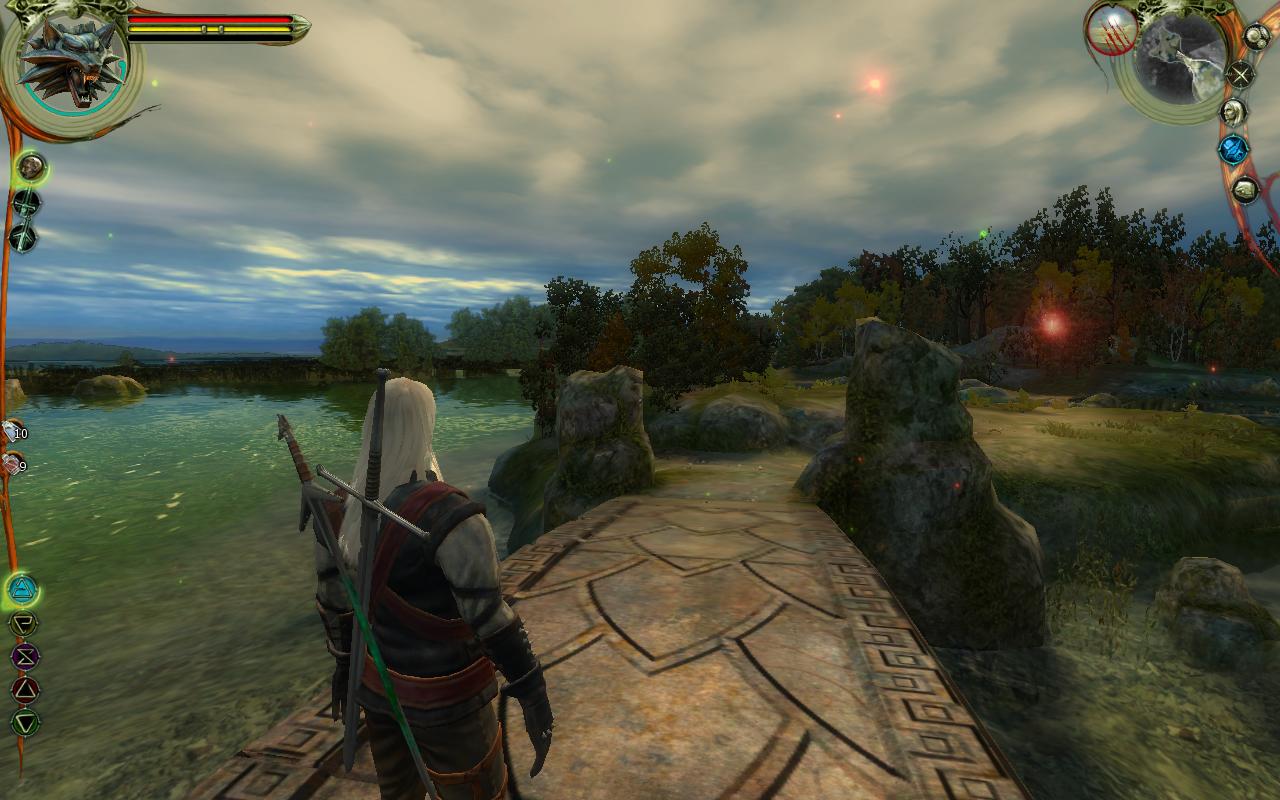
Chapter 4 moves to the Lakeside. The atmosphere here was wonderful, relaxing and the story line here provided a much needed break from main storyline. This is my favourite chapter in the game - this "diplomacy" chapter where you were just helping characters sort out their domestic disputes (with monster killing too of course) was very fun, and a few of the characters were quite memorable.
Chapter 5 and the Epilogue returns Geralt to Vizima to finish what is was started in the Prologue. This section, forming the conclusion of the game was quite interesting to look at - the environments were varied but they made sense, and weren't too tedious.
Some of the enemies were quite difficult for the player character's level of experience, even with potions and stuff you still die several times. Come back, level up a but more and it's easy. If you don't like frustration... edit the save game like I did if it was too frustrating and ruining the actual fun. Actually this may have been improved in Witcher 2 as I haven't felt the need to that this time. Sometimes I still read the walkthroughs or play videos just to realise something obvious I missed though.
Some of the buildings seem almost as tall as Geralt from the outside, but inside they are normal height. Typically though RPG buildings are 1/3 scale from the outside.
fan made bonus adventures that CDPR had professionally voiced for the release of the Enhanced Edition. (I don't believe that they were fan made mods anymore - I once did, but from reading around I think they are indeed developed by CDPR; but they had that fan made feel to them.)
 |
| http://www.significant-bits.com/witcher-and-fisstech |
Favourite game play elements:
- Click to move if you are lazy.
- Witcher attack styles.
- Drinking alcohol makes you drunk.
- Combining potions with special ingredients to make extra strong ones.
- Hold down alt key to highlight objects.
- You could press space key to pause the game even if mid combat and change Signs or drink potions. Look around the world.
- Adding custom way point markers to the map.
Chapters and environments:
Prologue - Kaer Moren new and fresh. What's interesting is the premium module The Price of Neutrality actually uses the Prologue map as a real level even though in the original game it was only an in-game cut scene. This was because the cut scene wasn't just a video, it was a scripted camera animation path using the normal game engine.Chapter 1 - Outskirts of Visima like a small country town. It serves as an introduction to some of the characters and the continuing story line. This level wasn't too tedious though it was lengthy (it felt about the length of chapter2), it seemed to provide enough variety.
Chapter 2 and 3 are set in Visima itself. Great looking city. These two chapters get a bit long and tedious. But they form the bulk of the story line. In these sections, there was a lot of running around between the city areas and the swamp area, with the swamp area being particularly annoying as there were so many things out to kill you. Chapter 3 was probably the longest in my opinion.
Chapter 4 moves to the Lakeside. The atmosphere here was wonderful, relaxing and the story line here provided a much needed break from main storyline. This is my favourite chapter in the game - this "diplomacy" chapter where you were just helping characters sort out their domestic disputes (with monster killing too of course) was very fun, and a few of the characters were quite memorable.
Chapter 5 and the Epilogue returns Geralt to Vizima to finish what is was started in the Prologue. This section, forming the conclusion of the game was quite interesting to look at - the environments were varied but they made sense, and weren't too tedious.
Annoyances
You can only walk up a ramp or stairs even if the height above the ground is quite enough to easily jump down. This of course is a limitation of the game engine CDPR used, and they managed to improve this in second game by allowing you to climb up ledges or hop down from a height. In The Witcher 2 you can click at the edge so Geralt will jump down or climb up, or ascend or descend ladders. (It will play an animation for this.)Some of the enemies were quite difficult for the player character's level of experience, even with potions and stuff you still die several times. Come back, level up a but more and it's easy. If you don't like frustration... edit the save game like I did if it was too frustrating and ruining the actual fun. Actually this may have been improved in Witcher 2 as I haven't felt the need to that this time. Sometimes I still read the walkthroughs or play videos just to realise something obvious I missed though.
Some of the buildings seem almost as tall as Geralt from the outside, but inside they are normal height. Typically though RPG buildings are 1/3 scale from the outside.
Premium Modules
The premium modules wereSide Effects - 3.5 hours.
Side Effects has a very fun, "fan mod" feel about it, it's all the cool things you'd like to do in the game rolled up into a short story! It felt like exactly the sort of game I'd make if I were making a game with the editor, and... precisely the games my classmates made during our game design subject at university.
Price of Neutrality - 3 hours.
This module was fascinating and nostalgic because we were playing back with the other Witchers at Kaer Moren (and they were voiced by the original cast), but there a couple of frustrating times when I had to redo particular battles with monsters or that it was very difficult to survive a particular fight. But still I'd recommend playing it, just bear that in mind.
Sunday, November 24, 2013
Game Review: Extreme Forklifting
Extreme Forklifting is Android game for tablets and phones where you can drive a forklift (who'd have thought) in a third person view.
Though it uses virtual joystick type controls, I've found it easier to control with practice than first person shooters. Probably though that's because this game only has speed and direction control.
The steering wheel is on the left side, with the combined gear/throttle and fork control over on the right side.

Obviously it's a slower pace than a first person shooter - there's no time limit, and hey the pallets aren't going to attack!
Unfortunately being a slower paced game doesn't actually help you aim the forklift into strange angles. I'm sure there must be some trick to angling up a forklift, but I don't know it. The game does give you these little direct arrows showing you where your next pallet is or where to deliver the current one.


Though it uses virtual joystick type controls, I've found it easier to control with practice than first person shooters. Probably though that's because this game only has speed and direction control.
The steering wheel is on the left side, with the combined gear/throttle and fork control over on the right side.

Obviously it's a slower pace than a first person shooter - there's no time limit, and hey the pallets aren't going to attack!
Unfortunately being a slower paced game doesn't actually help you aim the forklift into strange angles. I'm sure there must be some trick to angling up a forklift, but I don't know it. The game does give you these little direct arrows showing you where your next pallet is or where to deliver the current one.

8-point turn?

I got another one. Somehow.
Argh, I tried the game because I thought it sounded interesting. It's still interesting, and I'd like to keep going with it, maybe I'll learn how to steer it. But, it has no story line or much of a goal. I wonder if driving a forklift would be easier in real life?
The game is free but ad supported (if you have internet access) from the Google Play store.
Thursday, November 11, 2010
MacBook Pro and Mac OSX Love+Hate
MacBook Pro
Love
The Long battery is quite nice - I seem to get the 7 hours I should, though I haven't ran it on battery for that time in the one session.
I really like the nice shape - it's good how it doesn't look like other laptops.
I love how it's so thin and on top of that it's the same thickness along the whole deceive so it fits in satchels easier.
Like
I like how the base doesn't seem get too hot when I am using it on my lap.
It handles windows file shares quite well, and finds them automatically, if possible.
Dislike
It has no hhd light or optical drive light so I can't tell what it's doing when it stops responding. This is annoying because it's just silly - they waste a hole with an IR port (see below) but don't want to put two colored lights on the front?
I've also discovered that it has no Ethernet lights - not a big issue (you can get it off Activity Monitor, which is a nice touch), but why not just put them on?
The miniDP needs an adapter to actually connect it to anything! I'm putting this in dislike not hate because I understand why they went with it - full DVI ports would have been more then the thickness of the laptop anyway!
Hate
Sharp! When I rest my arms on the front, the edge rubs into the my skin...
Mac OSX
Love
I love how you can Drag and drop to install applications - it's so much easier than having to go through a wizard.
The trackpad is quite good, I quite like the two fingered scrolling and navigate websites with three fingers. (Annoyingly though, swipe to navigate doesn't work in Mac Help...)
Like
I like how you can access the dictionary and calculator in spotlight search. In spotlight, it will show you the first few words of the definition of the word typed into it. Also, if you type math syntax into Spotlight, it will give the answer.
I think it's cool how you can quit a program while still inside option-tab. (By pressing q.)
Dislike
On Windows 7, you can drag windows to the edge of the screen, and it will resize it to half the screen width, so you can place them side by side. Mac should have this feature (or at least something similar), because it's supposed to be better than Windows.
I'm putting this in Dislike because while XP did have the ability to tile windows, it wasn't very visible, Windows 7 made it obvious but (to be fair) only came put recently.
I don't like how the red close button isn't consistent - sometimes it exits, sometimes it just closes the window. But this isn't too much of a problem because command+q exits the program completely anyway.
Hate
There's no global font scaling like on windows. On Windows, you can increase the global font processing size to make test look bigger. On Mac, everything is so small... This is partly worse because my MacBook Pro anti-glare only comes in high resolution. Why doesn't Mac have this ability when Windows does?
The green zoom button is useless in safari - if the browser is the same size as the web page, zoom does nothing at all.
There's no grouping of file types in Finder like on Windows. Even since XP, we could group icons in Explorer by file type, date, first letter or size. This separated groups of icons with a title and a border. I hate this because Windows has had this feature since 2001, and it can't be a difficult feature to implement.
Can only resize windows from the bottom-right - why? That means that you have drag the window opposite of where you want to resize it.
Love
The Long battery is quite nice - I seem to get the 7 hours I should, though I haven't ran it on battery for that time in the one session.
I really like the nice shape - it's good how it doesn't look like other laptops.
I love how it's so thin and on top of that it's the same thickness along the whole deceive so it fits in satchels easier.
Like
I like how the base doesn't seem get too hot when I am using it on my lap.
It handles windows file shares quite well, and finds them automatically, if possible.
Dislike
It has no hhd light or optical drive light so I can't tell what it's doing when it stops responding. This is annoying because it's just silly - they waste a hole with an IR port (see below) but don't want to put two colored lights on the front?
I've also discovered that it has no Ethernet lights - not a big issue (you can get it off Activity Monitor, which is a nice touch), but why not just put them on?
The miniDP needs an adapter to actually connect it to anything! I'm putting this in dislike not hate because I understand why they went with it - full DVI ports would have been more then the thickness of the laptop anyway!
Hate
Sharp! When I rest my arms on the front, the edge rubs into the my skin...
Mac OSX
Love
I love how you can Drag and drop to install applications - it's so much easier than having to go through a wizard.
The trackpad is quite good, I quite like the two fingered scrolling and navigate websites with three fingers. (Annoyingly though, swipe to navigate doesn't work in Mac Help...)
Like
I like how you can access the dictionary and calculator in spotlight search. In spotlight, it will show you the first few words of the definition of the word typed into it. Also, if you type math syntax into Spotlight, it will give the answer.
I think it's cool how you can quit a program while still inside option-tab. (By pressing q.)
Dislike
On Windows 7, you can drag windows to the edge of the screen, and it will resize it to half the screen width, so you can place them side by side. Mac should have this feature (or at least something similar), because it's supposed to be better than Windows.
I'm putting this in Dislike because while XP did have the ability to tile windows, it wasn't very visible, Windows 7 made it obvious but (to be fair) only came put recently.
I don't like how the red close button isn't consistent - sometimes it exits, sometimes it just closes the window. But this isn't too much of a problem because command+q exits the program completely anyway.
Hate
There's no global font scaling like on windows. On Windows, you can increase the global font processing size to make test look bigger. On Mac, everything is so small... This is partly worse because my MacBook Pro anti-glare only comes in high resolution. Why doesn't Mac have this ability when Windows does?
The green zoom button is useless in safari - if the browser is the same size as the web page, zoom does nothing at all.
There's no grouping of file types in Finder like on Windows. Even since XP, we could group icons in Explorer by file type, date, first letter or size. This separated groups of icons with a title and a border. I hate this because Windows has had this feature since 2001, and it can't be a difficult feature to implement.
Can only resize windows from the bottom-right - why? That means that you have drag the window opposite of where you want to resize it.
Monday, October 18, 2010
MacBook Pro unboxing!
My custom MacBook Pro finally arrived yesterday, so I was able to pick it up today. I ordered a 15” MBP with anti-glare screen which also became higher res (the anti-glare was only available in high res).
So of course, I took photos of it while I was unpacking it and setting it up.
(spoiler saves if you are buying one…)
(spoiler saves if you are buying one…)
(spoiler saves if you are buying one…)
(spoiler saves if you are buying one…)
(spoiler saves if you are buying one…)
(spoiler saves if you are buying one…)
(spoiler saves if you are buying one…)
(spoiler saves if you are buying one…)
(spoiler saves if you are buying one…)
(spoiler saves if you are buying one…)
(spoiler saves if you are buying one…)
(spoiler saves if you are buying one…)
(spoiler saves if you are buying one…)
(spoiler saves if you are buying one…)


Goodness, the box is thin! Saves packaging…


Ahh so is why: it just has the machine itself and piece of foam to help protect it. I guess everything else is underneath… In the box on the side is an extension cord for the electricity. I like how they included a pull tab to make it easier to get the laptop itself out.


Underneath, is the power supply transformer and documentation.

The top piece of foam. Lovely huh…

Hey! They even put a little book icon on the packet that contains books!

“Everything Mac”. The basic printed manual. “Everything else”. A packet of warranty info and backup media. Oh, oh! And stickers!! With Apple logos, just in case someone actually sticks them to their $2700 laptop!


Having the extension cord separate to the power plug is kinda cool.

The back…

Gotta read the EULA inside “Everything Else”.

Heh, done it now…. Cute….

The apple on the lid – it even has real depth!

The cool light on the power adapter changes colour depending on charge status. I like things that light up!

Wow, a welcome movie!!

Goodness it’s sharp! Could almost cut yourself on that thing!

Glowing keyboard!
I’ll try to post more little tidbits later!
Sunday, October 10, 2010
Naked iRiver x20
I decided to take apart my old iRiver x20 to see if I could make the jog-dial work properly again, otherwise I’d just take it to the electronics recycling centre, or give it away for parts to electronics friends.

(Wow, a replaceable battery, what will they think of next)
 Just a matter of prying the top open along the edges.


Hmm, not much to it really… I mean, it’s pretty thin…
More random images.


iRiver was kind enough to use normal screws and standard construction methods, so it was a very simple job to get it apart, I didn’t try to remove any components (I have no need for them). I couldn’t do anything with the jog-dial I couldn’t see how to get it apart, and the contacts have probably worn off anyway.
I’m donating these images to the community on a CC license (non commercial, attribs, share alike). If you use them for anything, please just tweet me @anthc – I’m just curious. DM me, for commercial use….
iRiver Photos by @anthc is licensed under a Creative Commons Attribution-NonCommercial-ShareAlike 3.0 Unported License.

Subscribe to:
Posts (Atom)